
Tuesday, 1 September 2026

Thursday, 21 October 2021
Display MacBook login screen on an external screen
Pre-requisite: Make sure that the external screen is connected to your macbook through HDMI or USB-C as this doesn't matter.
[Open the MacBook lid, press the power button, then close the lid immediately.]
That's it, and just wait till login screen gets displayed on the external screen.
Alternative method to turn on the device without the power button: http://afsawaf.blogspot.com/2021/10/turning-on-your-macbook-without-opening.html
That's very valuable if:
1- You want to access/use your device with a completely malfunctioning built-in screen.
2- You want a neat desktop setup using something like vertical stands. In this case you need to check: Turning on your macbook without opening the lid.
Tested successfully on MacBook Pro (13-inch, 2017, Four Thunderbolt 3 Ports) - macOS Big Sur 11.5
Turning on your MacBook without opening the lid
Just plug in the USB-C power cable, while the device is turned off.
It's good to know that it doesn't matter where the USB-C is connecting to as long as can pass power through to the device to turn it on. So, The USB-C other end can be connected to a power hub, charger, monitor, ...etc.
Tested successfully on MacBook Pro (13-inch, 2017, Four Thunderbolt 3 Ports) - macOS Big Sur 11.5
Monday, 7 June 2021
Philips Hue Go v2 battery level Gauge
No known app displays the battery level as of the second version released on 2019.
Sunday, 5 April 2020
Removing duplicate photos on macOS - Free Software - Duplicate Cleaner X
Duplicate Cleaner X is the best among several others that I tried.
Reviewed on macOS Catalina ver 10.15.4.
- Simple interface.
- Scan sub-folders and cross match.
- Quick scan. (2GB took only minutes)
- Auto-select for files deletion.
- Works for external HDDs.
 |
| Application Icon |
 |
| Application main screen - Duplicate Cleaner X ver. 2.0 |
Reviewed on macOS Catalina ver 10.15.4.
Tuesday, 31 March 2020
Accessing older NAS drives that only support SMB 1.0 & USB shared memory drives - Windows 10


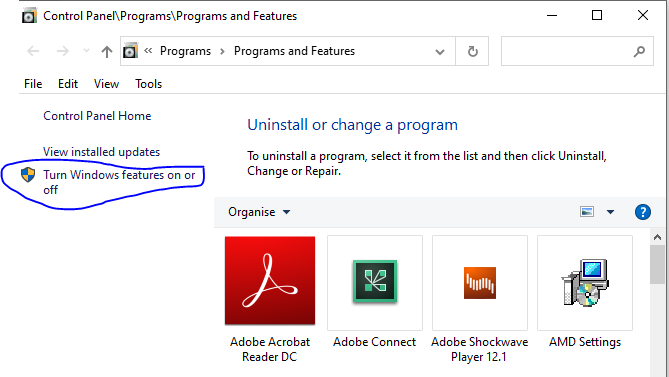

This has been documented to address an issue accessing a USB drive connected to the router Netcomm NF18ACV, which turned out to be related to the router only support for the old version of the SMB protocol. This protocol is disabled by default on Windows 10.
Screenshots from Windows 10 Home Single Language (Version: 2004)
For more about the SMB (Server Message Block) and the security risks associated with enabling the protocol, the following Wikipedia page is a good start:
https://en.wikipedia.org/wiki/Server_Message_Block
Sunday, 23 February 2020
Easy ways to arrange home screen icons in iOS 13 need a kind look!
As of today I failed to arrange my iPhone iOS 13.3.1 through:
1- Apple Configurator 2 on top of macOS Catalina 10.15.3:
Apple Configurator has a reported bug which prevents the changes from getting actually applied to the device.
https://discussions.apple.com/thread/250758336
2- iTunes on top of Windows 10:
iTunes no longer displays the apps as a seperate section to manage through the application; moreover the home screen(s) are no longer displayed.
https://discussions.apple.com/thread/8353318
The only way to do that was manually, yes by long tapping an app from the device screen and moving it across the screens.
https://support.apple.com/en-nz/guide/iphone/iph822ece7dd/ios
However, if you are a geek, you might have already figured out why the icons dance when you tap them for long; that's because you can, with another finger, drag more apps so that they can move together to another screen.
1- Apple Configurator 2 on top of macOS Catalina 10.15.3:
Apple Configurator has a reported bug which prevents the changes from getting actually applied to the device.
https://discussions.apple.com/thread/250758336
2- iTunes on top of Windows 10:
iTunes no longer displays the apps as a seperate section to manage through the application; moreover the home screen(s) are no longer displayed.
https://discussions.apple.com/thread/8353318
The only way to do that was manually, yes by long tapping an app from the device screen and moving it across the screens.
https://support.apple.com/en-nz/guide/iphone/iph822ece7dd/ios
However, if you are a geek, you might have already figured out why the icons dance when you tap them for long; that's because you can, with another finger, drag more apps so that they can move together to another screen.
Wednesday, 20 September 2017
Secrets about LinkedIn Invitations to connect!
Have you ever wondered about the limitations on the invitations you send for growing your network on the most popular professional networking platform: Linkedin?!
The following are some facts from the LinkedIn experts:
- Maximum number of of 1st-degree connections: 30,000 connections.
- Number of people who can follow you is unlimited.
- Your ability for sending invitations is limited , if many of your invitations are ignored or rejected. Attention!
- Invitations validity:
* 6 months for LinkedIn members.
* 2 weeks for non-LinkedIn members.
Inviting or Connecting with People on LinkedIn: https://www.linkedin.com/help/linkedin/answer/118?query=sending%20invitations%20to%20connect
Managing sent invitations\Withdrawing an invitation: https://www.linkedin.com/help/linkedin/answer/62008?query=checking%20pending%20invitations
Controlling who can send you invitations: https://www.linkedin.com/help/linkedin/answer/70
References:
https://www.linkedin.com/help/linkedin/answer/69689
https://www.linkedin.com/help/linkedin/answer/4800/invitation-limitations?lang=en
https://www.linkedin.com/help/linkedin/answer/26
https://www.linkedin.com/help/linkedin/answer/119?query=invitation%20validitiy
This information is as of 20th Sep, 2017, and since the platform is continuously evolving, it is advised to refer to the Linked help or support for the latest updates.
The following are some facts from the LinkedIn experts:
- Maximum number of of 1st-degree connections: 30,000 connections.
- Number of people who can follow you is unlimited.
- Your ability for sending invitations is limited , if many of your invitations are ignored or rejected. Attention!
- Invitations validity:
* 6 months for LinkedIn members.
* 2 weeks for non-LinkedIn members.
Inviting or Connecting with People on LinkedIn: https://www.linkedin.com/help/linkedin/answer/118?query=sending%20invitations%20to%20connect
Managing sent invitations\Withdrawing an invitation: https://www.linkedin.com/help/linkedin/answer/62008?query=checking%20pending%20invitations
Controlling who can send you invitations: https://www.linkedin.com/help/linkedin/answer/70
References:
https://www.linkedin.com/help/linkedin/answer/69689
https://www.linkedin.com/help/linkedin/answer/4800/invitation-limitations?lang=en
https://www.linkedin.com/help/linkedin/answer/26
https://www.linkedin.com/help/linkedin/answer/119?query=invitation%20validitiy
This information is as of 20th Sep, 2017, and since the platform is continuously evolving, it is advised to refer to the Linked help or support for the latest updates.
Subscribe to:
Posts (Atom)