Sunday, 5 April 2020

Removing duplicate photos on macOS - Free Software - Duplicate Cleaner X

Duplicate Cleaner X is the best among several others that I tried.

  • Simple interface.
  • Scan sub-folders and cross match.
  • Quick scan. (2GB took only minutes)
  • Auto-select for files deletion.
  • Works for external HDDs.


Application Icon
Application main screen - Duplicate Cleaner X ver. 2.0


Reviewed on macOS Catalina ver 10.15.4.

Tuesday, 31 March 2020

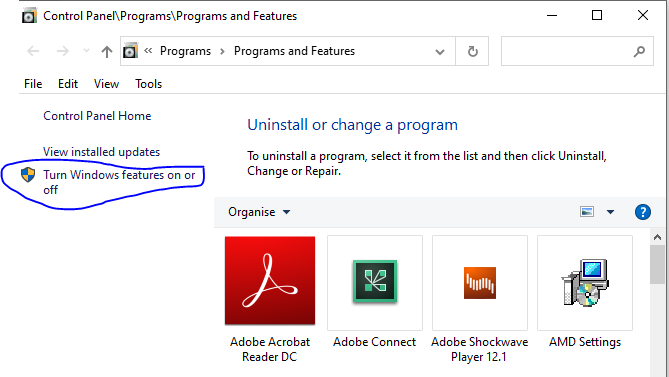
Accessing older NAS drives that only support SMB 1.0 & USB shared memory drives - Windows 10


This has been documented to address an issue accessing a USB drive connected to the router Netcomm NF18ACV, which turned out to be related to the router only support for the old version of the SMB protocol. This protocol is disabled by default on Windows 10.

Screenshots from Windows 10 Home Single Language (Version: 2004)


For more about the SMB (Server Message Block) and the security risks associated with enabling the protocol, the following Wikipedia page is a good start:

https://en.wikipedia.org/wiki/Server_Message_Block

Sunday, 23 February 2020

Easy ways to arrange home screen icons in iOS 13 need a kind look!

As of today I failed to arrange my iPhone iOS 13.3.1 through:

1- Apple Configurator 2 on top of macOS Catalina 10.15.3:

Apple Configurator has a reported bug which prevents the changes from getting actually applied to the device.

https://discussions.apple.com/thread/250758336

2- iTunes on top of Windows 10:
iTunes no longer displays the apps as a seperate section to manage through the application; moreover the home screen(s) are no longer displayed.

https://discussions.apple.com/thread/8353318

The only way to do that was manually, yes by long tapping an app from the device screen and moving it across the screens.

https://support.apple.com/en-nz/guide/iphone/iph822ece7dd/ios

However, if you are a geek, you might have already figured out why the icons dance when you tap them for long; that's because you can, with another finger, drag more apps so that they can move together to another screen.


Wednesday, 20 September 2017

Secrets about LinkedIn Invitations to connect!

Have you ever wondered about the limitations on the invitations you send for growing your network on the most popular professional networking platform: Linkedin?!

The following are some facts from the LinkedIn experts:

- Maximum number of of 1st-degree connections: 30,000 connections.
- Number of people who can follow you is unlimited.
- Your ability for sending invitations is limited , if many of your invitations are ignored or rejected. Attention!
- Invitations validity: 
    * 6 months for LinkedIn members.
    * 2 weeks for non-LinkedIn members.

Inviting or Connecting with People on LinkedIn: https://www.linkedin.com/help/linkedin/answer/118?query=sending%20invitations%20to%20connect

Managing sent invitations\Withdrawing an invitation: https://www.linkedin.com/help/linkedin/answer/62008?query=checking%20pending%20invitations

Controlling who can send you invitations: https://www.linkedin.com/help/linkedin/answer/70

References:
https://www.linkedin.com/help/linkedin/answer/69689
https://www.linkedin.com/help/linkedin/answer/4800/invitation-limitations?lang=en
https://www.linkedin.com/help/linkedin/answer/26
https://www.linkedin.com/help/linkedin/answer/119?query=invitation%20validitiy

This information is as of 20th Sep, 2017, and since the platform is continuously evolving, it is advised to refer to the Linked help or support for the latest updates.

Sending LinkedIn message to someone outside your network! (Free - No InMail)

Objective: Sending a message to someone outside your network, when message button is unavailable.

Method:    Send an invitation request with a note.

How to:     Open the person's contact page and select "Add Note", while sending an invitation request.

The other party will receive your message with the Invitation Request!

Friday, 20 May 2016

Consistency in product, process and project management

Although the say goes: Consistency is the key to success.
I say: Consistency is the key to excellence! 

- This starts from sustaining customers' loyalty, as customers usually flee from services that are undetermined.

- Significantly, total cost of ownership is directly proportional to the variations in your processes and the work practices. So the more coherent and consistent processes you operate, the lower the cost of their maintenance.

- Overall governance and compliance frameworks are highly challenged by inconsistent work set-ups.


In short, achieving consistency within your  products,  processes and project management practices is critical in aligning their objectives to your business goals.

There are several methods for achieving this consistency, such as:

- Adopting a unified project management methodology, which is disciplined enough to handle complex and long term projects, as well as being agile enough to exploit quick wins and ah-hoc engagements.

- Promoting one-stop-shop for the inception, design, inauguration, and continual improvement for your policies, processes, standards, procedures and practices.

- Conducting regular awareness campaigns with the latest enterprise processes and standards operating procedures.

Thursday, 4 February 2016

Tip: Moving folders in SharePoint

My easiest way for doing this is to open the document library within the Windows Explorer using the button: "Open with Explorer"


- Make sure that you are using IE 32 bit.

You can know that by opening the Task manager and checking the process name, if suffixed by *32, then it is the 32 bit version of browser.

By default, usually the 32 bit version from the browser is launched.

- Don't use compatibility mode while opening the SharePoint site.


Sunday, 29 November 2015

How to establish Green Operations?!

Green Operations, here, refers to operations, which follow the rules and regulations "by the book" to achieve the highest interests for the enterprise.


First - Red - Policies: (Rules and Norms)

Establish the required policies.

Second - Blue - Standards: (Build on others' success )

Define the related standards.

Third - Orange - SOPs: (How to get it done?)

Detail the SOPs (Standard Operating Procedures).

Fourth - Yellow - Guidelines: (Recommendations)

Support with guidelines and best practices.

Fifth - Green - Operations: (Actual Work)

Act in a green way!