
Tuesday, 1 September 2026

Thursday, 21 October 2021
Display MacBook login screen on an external screen
Pre-requisite: Make sure that the external screen is connected to your macbook through HDMI or USB-C as this doesn't matter.
[Open the MacBook lid, press the power button, then close the lid immediately.]
That's it, and just wait till login screen gets displayed on the external screen.
Alternative method to turn on the device without the power button: http://afsawaf.blogspot.com/2021/10/turning-on-your-macbook-without-opening.html
That's very valuable if:
1- You want to access/use your device with a completely malfunctioning built-in screen.
2- You want a neat desktop setup using something like vertical stands. In this case you need to check: Turning on your macbook without opening the lid.
Tested successfully on MacBook Pro (13-inch, 2017, Four Thunderbolt 3 Ports) - macOS Big Sur 11.5
Turning on your MacBook without opening the lid
Just plug in the USB-C power cable, while the device is turned off.
It's good to know that it doesn't matter where the USB-C is connecting to as long as can pass power through to the device to turn it on. So, The USB-C other end can be connected to a power hub, charger, monitor, ...etc.
Tested successfully on MacBook Pro (13-inch, 2017, Four Thunderbolt 3 Ports) - macOS Big Sur 11.5
Monday, 7 June 2021
Philips Hue Go v2 battery level Gauge
No known app displays the battery level as of the second version released on 2019.
Sunday, 5 April 2020
Removing duplicate photos on macOS - Free Software - Duplicate Cleaner X
Duplicate Cleaner X is the best among several others that I tried.
Reviewed on macOS Catalina ver 10.15.4.
- Simple interface.
- Scan sub-folders and cross match.
- Quick scan. (2GB took only minutes)
- Auto-select for files deletion.
- Works for external HDDs.
 |
| Application Icon |
 |
| Application main screen - Duplicate Cleaner X ver. 2.0 |
Reviewed on macOS Catalina ver 10.15.4.
Tuesday, 31 March 2020
Accessing older NAS drives that only support SMB 1.0 & USB shared memory drives - Windows 10


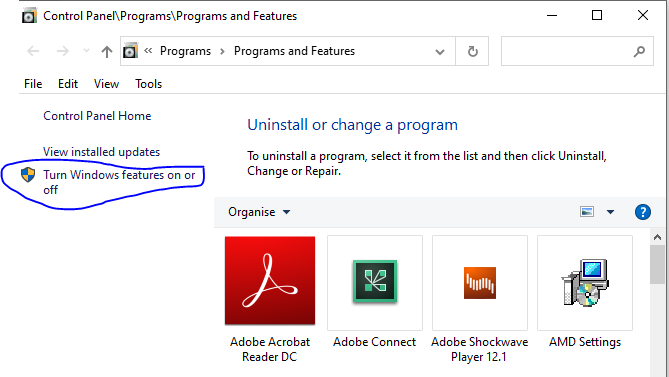

This has been documented to address an issue accessing a USB drive connected to the router Netcomm NF18ACV, which turned out to be related to the router only support for the old version of the SMB protocol. This protocol is disabled by default on Windows 10.
Screenshots from Windows 10 Home Single Language (Version: 2004)
For more about the SMB (Server Message Block) and the security risks associated with enabling the protocol, the following Wikipedia page is a good start:
https://en.wikipedia.org/wiki/Server_Message_Block
Sunday, 23 February 2020
Easy ways to arrange home screen icons in iOS 13 need a kind look!
As of today I failed to arrange my iPhone iOS 13.3.1 through:
1- Apple Configurator 2 on top of macOS Catalina 10.15.3:
Apple Configurator has a reported bug which prevents the changes from getting actually applied to the device.
https://discussions.apple.com/thread/250758336
2- iTunes on top of Windows 10:
iTunes no longer displays the apps as a seperate section to manage through the application; moreover the home screen(s) are no longer displayed.
https://discussions.apple.com/thread/8353318
The only way to do that was manually, yes by long tapping an app from the device screen and moving it across the screens.
https://support.apple.com/en-nz/guide/iphone/iph822ece7dd/ios
However, if you are a geek, you might have already figured out why the icons dance when you tap them for long; that's because you can, with another finger, drag more apps so that they can move together to another screen.
1- Apple Configurator 2 on top of macOS Catalina 10.15.3:
Apple Configurator has a reported bug which prevents the changes from getting actually applied to the device.
https://discussions.apple.com/thread/250758336
2- iTunes on top of Windows 10:
iTunes no longer displays the apps as a seperate section to manage through the application; moreover the home screen(s) are no longer displayed.
https://discussions.apple.com/thread/8353318
The only way to do that was manually, yes by long tapping an app from the device screen and moving it across the screens.
https://support.apple.com/en-nz/guide/iphone/iph822ece7dd/ios
However, if you are a geek, you might have already figured out why the icons dance when you tap them for long; that's because you can, with another finger, drag more apps so that they can move together to another screen.
Wednesday, 20 September 2017
Secrets about LinkedIn Invitations to connect!
Have you ever wondered about the limitations on the invitations you send for growing your network on the most popular professional networking platform: Linkedin?!
The following are some facts from the LinkedIn experts:
- Maximum number of of 1st-degree connections: 30,000 connections.
- Number of people who can follow you is unlimited.
- Your ability for sending invitations is limited , if many of your invitations are ignored or rejected. Attention!
- Invitations validity:
* 6 months for LinkedIn members.
* 2 weeks for non-LinkedIn members.
Inviting or Connecting with People on LinkedIn: https://www.linkedin.com/help/linkedin/answer/118?query=sending%20invitations%20to%20connect
Managing sent invitations\Withdrawing an invitation: https://www.linkedin.com/help/linkedin/answer/62008?query=checking%20pending%20invitations
Controlling who can send you invitations: https://www.linkedin.com/help/linkedin/answer/70
References:
https://www.linkedin.com/help/linkedin/answer/69689
https://www.linkedin.com/help/linkedin/answer/4800/invitation-limitations?lang=en
https://www.linkedin.com/help/linkedin/answer/26
https://www.linkedin.com/help/linkedin/answer/119?query=invitation%20validitiy
This information is as of 20th Sep, 2017, and since the platform is continuously evolving, it is advised to refer to the Linked help or support for the latest updates.
The following are some facts from the LinkedIn experts:
- Maximum number of of 1st-degree connections: 30,000 connections.
- Number of people who can follow you is unlimited.
- Your ability for sending invitations is limited , if many of your invitations are ignored or rejected. Attention!
- Invitations validity:
* 6 months for LinkedIn members.
* 2 weeks for non-LinkedIn members.
Inviting or Connecting with People on LinkedIn: https://www.linkedin.com/help/linkedin/answer/118?query=sending%20invitations%20to%20connect
Managing sent invitations\Withdrawing an invitation: https://www.linkedin.com/help/linkedin/answer/62008?query=checking%20pending%20invitations
Controlling who can send you invitations: https://www.linkedin.com/help/linkedin/answer/70
References:
https://www.linkedin.com/help/linkedin/answer/69689
https://www.linkedin.com/help/linkedin/answer/4800/invitation-limitations?lang=en
https://www.linkedin.com/help/linkedin/answer/26
https://www.linkedin.com/help/linkedin/answer/119?query=invitation%20validitiy
This information is as of 20th Sep, 2017, and since the platform is continuously evolving, it is advised to refer to the Linked help or support for the latest updates.
Sending LinkedIn message to someone outside your network! (Free - No InMail)
Objective: Sending a message to someone outside your network, when message button is unavailable.
Method: Send an invitation request with a note.
How to: Open the person's contact page and select "Add Note", while sending an invitation request.
The other party will receive your message with the Invitation Request!
Method: Send an invitation request with a note.
How to: Open the person's contact page and select "Add Note", while sending an invitation request.
The other party will receive your message with the Invitation Request!
Friday, 20 May 2016
Consistency in product, process and project management
Although the say goes: Consistency is the key to success.
I say: Consistency is the key to excellence!
- This starts from sustaining customers' loyalty, as customers usually flee from services that are undetermined.
- Significantly, total cost of ownership is directly proportional to the variations in your processes and the work practices. So the more coherent and consistent processes you operate, the lower the cost of their maintenance.
- Overall governance and compliance frameworks are highly challenged by inconsistent work set-ups.
In short, achieving consistency within your products, processes and project management practices is critical in aligning their objectives to your business goals.
There are several methods for achieving this consistency, such as:
- Adopting a unified project management methodology, which is disciplined enough to handle complex and long term projects, as well as being agile enough to exploit quick wins and ah-hoc engagements.
- Promoting one-stop-shop for the inception, design, inauguration, and continual improvement for your policies, processes, standards, procedures and practices.
- Conducting regular awareness campaigns with the latest enterprise processes and standards operating procedures.
I say: Consistency is the key to excellence!
- This starts from sustaining customers' loyalty, as customers usually flee from services that are undetermined.
- Significantly, total cost of ownership is directly proportional to the variations in your processes and the work practices. So the more coherent and consistent processes you operate, the lower the cost of their maintenance.
- Overall governance and compliance frameworks are highly challenged by inconsistent work set-ups.
In short, achieving consistency within your products, processes and project management practices is critical in aligning their objectives to your business goals.
There are several methods for achieving this consistency, such as:
- Adopting a unified project management methodology, which is disciplined enough to handle complex and long term projects, as well as being agile enough to exploit quick wins and ah-hoc engagements.
- Promoting one-stop-shop for the inception, design, inauguration, and continual improvement for your policies, processes, standards, procedures and practices.
- Conducting regular awareness campaigns with the latest enterprise processes and standards operating procedures.
Thursday, 4 February 2016
Tip: Moving folders in SharePoint
My easiest way for doing this is to open the document library within the Windows Explorer using the button: "Open with Explorer"


- Make sure that you are using IE 32 bit.
You can know that by opening the Task manager and checking the process name, if suffixed by *32, then it is the 32 bit version of browser.
By default, usually the 32 bit version from the browser is launched.
- Don't use compatibility mode while opening the SharePoint site.
Sunday, 29 November 2015
How to establish Green Operations?!
Green Operations, here, refers to operations, which follow the rules and regulations "by the book" to achieve the highest interests for the enterprise.
First - Red - Policies: (Rules and Norms)
Establish the required policies.
Second - Blue - Standards: (Build on others' success )
Define the related standards.
Third - Orange - SOPs: (How to get it done?)
Detail the SOPs (Standard Operating Procedures).
Fourth - Yellow - Guidelines: (Recommendations)
Support with guidelines and best practices.
Fifth - Green - Operations: (Actual Work)
Act in a green way!
First - Red - Policies: (Rules and Norms)
Establish the required policies.
Second - Blue - Standards: (Build on others' success )
Define the related standards.
Third - Orange - SOPs: (How to get it done?)
Detail the SOPs (Standard Operating Procedures).
Fourth - Yellow - Guidelines: (Recommendations)
Support with guidelines and best practices.
Fifth - Green - Operations: (Actual Work)
Act in a green way!
Monday, 17 August 2015
Why aren't surveys the best feedback elicitation tool?!
Although the value of surveys cannot be denied, and the stakeholders’ feedback, in general, is so valuable in
improving the service they receive; I am in the habit of volunteering very little time for filling-in
surveys!!
Simply for many reasons about the survey itself:
- -
Not my business.
It is not directly contributing to my own business objectives,
only indirectly through the service I receive from that service provider.
- - Accountability.
In all ways, the service provider is accountable to deliver the
service of highest quality based on its experience with its business, not based
on the experience I transfer to it.
- - Prioritization.
My feedback as an end user to a service provider is voluntary,
not explicitly a measured output for my day work, so it is with low priority
unless there is a specific reason to change that.
- - Time.
It is time consuming, filling the survey is a commitment, which
consumes time in context switching from other day activities into opening the
survey tool, and reflecting on my past experience to fill-in the answers
appropriately. It is not very accurate, in reality, to measure that by the few
minutes consumed in checking the radio buttons.
- - Fun.
it is boring; it usually lacks any fun. Especially those typical direct expected questions
like “Rate your satisfaction with that specific service in the scale A-D”, “Do
you think we are doing good in delivering our service A?”
What I would suggest is to
vary the tools to obtain the same desired output.
For example:
- - Feedback can be much more diverse and innovative
through focus groups.
- - Highest reliability can be achieved through direct
interviews with staff, where the input is based on real stories.
- - Much more engagement can be achieved through
introducing gamification into the process.
- - Improving the effectiveness of a specific tool might
be reached through combining two tools together, such as focus groups and
targeted surveys.
Wednesday, 12 August 2015
The unit for measuring project's work
The answer is Time!
Yes, it is at the first sight a bit surprising since time is used also for scheduling. However, when we mention scheduling, we are more concerned about the task duration with a specific number of resources assigned to complete it.
Take care that!
A specified task duration assigned to a single resource can't be directly halved by assigning it to 2 resources:
This might be an over simplification, as usually this involves at least some interaction between the resources which can add to the communication overhead work to be performed.
Yes, it is at the first sight a bit surprising since time is used also for scheduling. However, when we mention scheduling, we are more concerned about the task duration with a specific number of resources assigned to complete it.
Take care that!
A specified task duration assigned to a single resource can't be directly halved by assigning it to 2 resources:
This might be an over simplification, as usually this involves at least some interaction between the resources which can add to the communication overhead work to be performed.
Tuesday, 4 August 2015
PRINCE2 Practitioner Exam Time Preparation
Examination Paper:
--> Scenario Booklet: (1 scenario + possible additional information for specific questions)
--> Question Booklet:
(8 questions,
each contains 10 question lines subdivided into parts,
each part covers specific syllabus area identified at the beginning of the question)
--> Answer Booklet
Syllabus:
Timing: (2h30)
Grading:
80 Qs for 80 marks
Pass: 44 marks (55%)
Good luck!
* Some content is based on information from Axelos PRINCE2 Practitioner Examination Candidate Guidance ver 1.12
--> Scenario Booklet: (1 scenario + possible additional information for specific questions)
--> Question Booklet:
(8 questions,
each contains 10 question lines subdivided into parts,
each part covers specific syllabus area identified at the beginning of the question)
--> Answer Booklet
Syllabus:
Area
|
Themes
|
Process
Groups
|
Others
|
1- Business Case
|
1-
Starting up a project
Initiating a project
|
Overview
|
|
2- Organization
|
2-
Directing a project
Managing a stage boundary
Closing a project
|
Principles
|
|
3- Quality
|
3-
Controlling a stage
Managing product delivery
|
Tailoring PRINCE2
|
|
4- Plans
|
|||
5- Risk
|
|||
6- Change
|
|||
7- Progress
|
|||
Examined
|
6 out of 7
|
2 out of 3
|
- Not examined
- May be included in other questions
|
Timing: (2h30)
Activity
|
Scenario &
Overall
|
Q1
|
Q2
|
Q3
|
Q4
|
Q5
|
Q6
|
Q7
|
Q8
|
Tolerance
|
Minutes
|
10
|
15
|
15
|
15
|
15
|
15
|
15
|
15
|
15
|
20
|
Accumulative
|
0h10
|
0h25
|
0h40
|
0h55
|
1h10
|
1h25
|
1h40
|
1h55
|
2h10
|
2h30
|
Grading:
80 Qs for 80 marks
Pass: 44 marks (55%)
Good luck!
* Some content is based on information from Axelos PRINCE2 Practitioner Examination Candidate Guidance ver 1.12
Wednesday, 29 July 2015
Confused project management terminology: Issue, Off-specification, and Change Request
Issue: A problem that needs either resolution or attention by the project manager.
Off-specification: A project product which has not or forecast-ed not to be delivered as originally base-lined.
Change Request: It is a request for a change to a product from its base-lined form.
For example (Producing a budget laptop):
Issue: Processor specified is no longer in production.
Off-specification: Processor in the final laptop product over-heat.
Change Request: Senior User request a higher frequency processor for the laptop.
N.B. This is within the context for PRINCE2 terminology
Off-specification: A project product which has not or forecast-ed not to be delivered as originally base-lined.
Change Request: It is a request for a change to a product from its base-lined form.
For example (Producing a budget laptop):
Issue: Processor specified is no longer in production.
Off-specification: Processor in the final laptop product over-heat.
Change Request: Senior User request a higher frequency processor for the laptop.
N.B. This is within the context for PRINCE2 terminology
Sunday, 28 June 2015
Difference between Business Analyst and Systems Analyst (within the context of the IT)
This is from my own perspective and mainly based on my personal experience:
Business Analyst:
Re-document the business rules and the business processes in a format and terminology that is eligible to be consumed as requirements for introducing new system(s) or redefining an existing business.
Systems Analyst:
Either re-document the exiting system(s) or conclude other systems in an answer to highlight the suitability for fulfilling the defined set of requirements.
Business Analyst:
Re-document the business rules and the business processes in a format and terminology that is eligible to be consumed as requirements for introducing new system(s) or redefining an existing business.
Systems Analyst:
Either re-document the exiting system(s) or conclude other systems in an answer to highlight the suitability for fulfilling the defined set of requirements.
Tuesday, 23 June 2015
User experience - Apple support in Egypt: Thanks Apple!
In comparison to my frustration last year trying to figure out an issue with my iPhone in my home country Egypt, I was very satisfied few days ago when I approached the company for an iOS support ticket. It's understood that Apple has no Apple stores in Egypt, only re-sellers, and the iPhones especially are supported through the mobile network operators. So those who purchase their handsets from outside the country, like my case, are mostly left behind with very limited support through the re-sellers.
My story started when I first tried to enable keychain on my device. To complete the operation, I should receive the security code on my registered phone number with Apple; however, since I purchased my device from Geneva, it looks like I have selected the country as Switzerland when I first set it up. Hence, whenever the service tries to send to me an SMS, it never reaches me as it was addressing my correct Egyptian number, except with a Swizerland's prefix.
https://www.apple.com/eg/support
Contact Us --> Get Started --> Select a product --> Select a topic --> "This Topic is not listed" --> Fill in the topic details -->

I have started my support request through Apple's online chat where the agent advised me to dial Apple support through the phone since resetting my account information requires verification which cannot be completed through the chat window. Moreover, he kindly shared a list of contacts which did not include Egypt and advised me to call the nearest location if my country is not listed. Before I do, I gave it a second shot for searching again on the Apple official site for support contacts until finally I found a toll-free support number (0800 000 0888) which answered with the reply that my call was outside the working hours. Another visit to the website, I was amazed to find a support call-in service with doubts that it might even work in Egypt. Anyway, I decided to give it a try and reserved an appointment annotated with my request topic. On the pre-defined time, I received the call which started by few minutes of waiting time. Then an agent replied and asked me about my issue, and looks like she recorded it very professionally and consulted someone or or another system. Finally, after some relatively long waiting period, she kindly returned with questions for verifying my identity, then some more waiting time which seams to me that she was waiting for her system interface to respond. Consequently she very patiently helped me through the resolution and confirmed it before we close the line.
Overall, I can say I had a very good user experience, starting from the scheduled call, passing by the very helpful agent, and more importantly she was able to find a way to resolve my issue in a single call.
It is worth mentioning that I questioned the location of the call center which turned out to be located in Athens; however, all the experience I perceived was merely Egyptian; the whole call was in the local Egyptian accent. Impressed!
I believe this post is my thank you token for Apple and that dedicated agent!
My story started when I first tried to enable keychain on my device. To complete the operation, I should receive the security code on my registered phone number with Apple; however, since I purchased my device from Geneva, it looks like I have selected the country as Switzerland when I first set it up. Hence, whenever the service tries to send to me an SMS, it never reaches me as it was addressing my correct Egyptian number, except with a Swizerland's prefix.
https://www.apple.com/eg/support
Contact Us --> Get Started --> Select a product --> Select a topic --> "This Topic is not listed" --> Fill in the topic details -->

I have started my support request through Apple's online chat where the agent advised me to dial Apple support through the phone since resetting my account information requires verification which cannot be completed through the chat window. Moreover, he kindly shared a list of contacts which did not include Egypt and advised me to call the nearest location if my country is not listed. Before I do, I gave it a second shot for searching again on the Apple official site for support contacts until finally I found a toll-free support number (0800 000 0888) which answered with the reply that my call was outside the working hours. Another visit to the website, I was amazed to find a support call-in service with doubts that it might even work in Egypt. Anyway, I decided to give it a try and reserved an appointment annotated with my request topic. On the pre-defined time, I received the call which started by few minutes of waiting time. Then an agent replied and asked me about my issue, and looks like she recorded it very professionally and consulted someone or or another system. Finally, after some relatively long waiting period, she kindly returned with questions for verifying my identity, then some more waiting time which seams to me that she was waiting for her system interface to respond. Consequently she very patiently helped me through the resolution and confirmed it before we close the line.
Overall, I can say I had a very good user experience, starting from the scheduled call, passing by the very helpful agent, and more importantly she was able to find a way to resolve my issue in a single call.
It is worth mentioning that I questioned the location of the call center which turned out to be located in Athens; however, all the experience I perceived was merely Egyptian; the whole call was in the local Egyptian accent. Impressed!
I believe this post is my thank you token for Apple and that dedicated agent!
Sunday, 21 June 2015
Writing technical documents with gender neutral language
1)
The form no one enjoys reading:
The project manager approved the estimates and added it to her or his project plan.
The more appropriate form:
The project manager approved the estimates and added it to the project plan.
2)
The form no one enjoys reading:
The professional project manager considers all the risks. S\he also categorizes them.
The more appropriate form:
The professional project managers consider all the risks. They also categorize them.
3)
On the level of words comes some examples:
Chairman --> Chair
Policeman --> Police officer
4)
For titles, unless you are sure about the specific person's preference;
Miss --> Ms
Mrs --> Ms
The form no one enjoys reading:
The project manager approved the estimates and added it to her or his project plan.
The more appropriate form:
The project manager approved the estimates and added it to the project plan.
2)
The form no one enjoys reading:
The professional project manager considers all the risks. S\he also categorizes them.
The more appropriate form:
The professional project managers consider all the risks. They also categorize them.
3)
On the level of words comes some examples:
Chairman --> Chair
Policeman --> Police officer
4)
For titles, unless you are sure about the specific person's preference;
Miss --> Ms
Mrs --> Ms
Monday, 15 June 2015
A killing mistake for task scheduling: 12:00AM or 12:PM
To cut it short:
12:00PM is noon.
12:00AM is mid-night.
12:00PM is noon.
12:00AM is mid-night.
Subscribe to:
Posts (Atom)