Thursday, 14 March 2013

Setting wireless networks priorities for Windows


1) Display list of current profiles:
>netsh wlan show profiles

Profiles on interface Wireless Network Connection:

Group policy profiles (read only)
---------------------------------
    <None>

User profiles
-------------
  

    All User Profile     : BASIC_IBIS

    All User Profile     : Belkin

    All User Profile     : Serena-WiFi

    All User Profile     : MOBILE


    All User Profile     : belkin54g


2) Change profiles priority:

>netsh wlan set profileorder name="Belkin" interface="Wireless Network Connection" priority=1
Priority order of profile "Belkin" is updated successfully.

C:\Users\sawafa.EMRO>netsh wlan show profiles

Profiles on interface Wireless Network Connection:

Group policy profiles (read only)
---------------------------------
    <None>

User profiles
-------------
    All User Profile     : Belkin
    All User Profile     : BASIC_IBIS
    All User Profile     : Serena-WiFi
    All User Profile     : MOBILE
    All User Profile     : belkin54g


Monday, 11 March 2013

Merge Outlook calendars together

Easy like copy & paste, the trick is to change the view to accept copy\paste:

Open the seconary calendar to merge:
- "View" from the menu
- "Chnage View" from the Ribbon
- "List" from the submenu
- Select All "Ctrl+A" then "Ctrl+C"
- Move to destination calendar "Ctrl+V"


Sunday, 10 March 2013

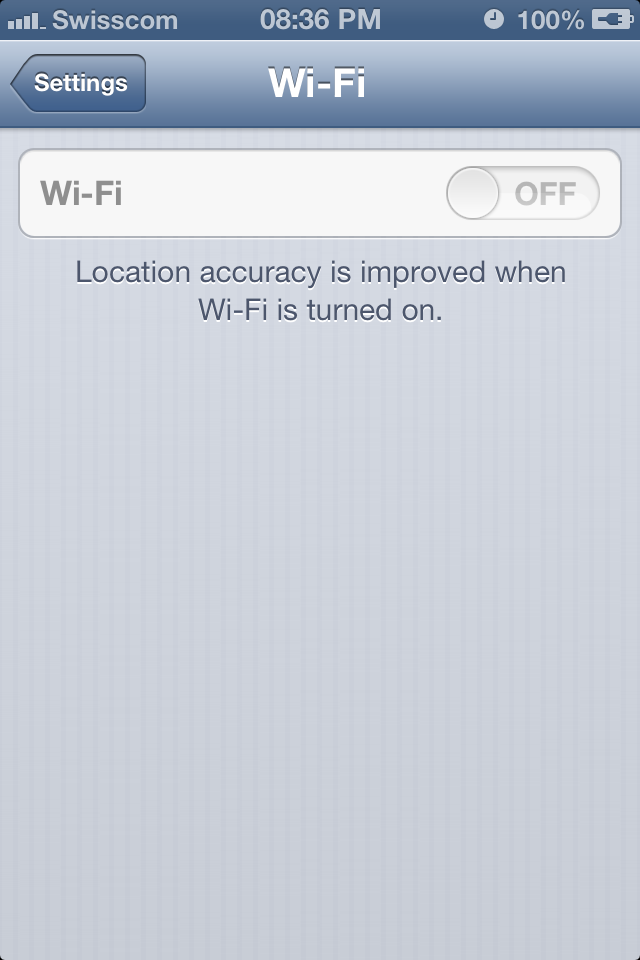
Feature I would not like to see in: iOS 6 tests stop the functionality for my iPhone 4S WiFi & Bluetooth

If that was what they call an update, I no longer want similar Apple updates!

Apple staff replies to my queries regarding the cause for my issue is that my device might originally had this H\W defect and the iOS upgrade might have included further tests which resulted in its detection and no longer enables the H\W to function!

Story starts, or as far as I understand (since although I believe it is attributed to the update, I can't claim I am pretty sure), shortly following my iOS 6 update:


1- iOS update installed smoothly and I have no problem for a week or so.
2- Using the Bluetooth in my car as usual, and between my calls, Bluetooth stopped functioning. Meaning that I completed a call with Bluetooth hands-free and my next call few minutes after that, the call was only through my device and I noticed it was disconnected from the car system.
3- Several trials to shutdown and start the device, hard restart the iPhone  and restarting\resetting my car audio system, with no success.(Only the spinning Bluetooth wheel.)
4- My big shock was that the WiFi button was completely disabled.
5- So much frustrated now, I backup-ed the device, and restored, backup-ed up and wiped it completely off. I found no way to downgrade. No Hope, at all!
6- Headed to the apple store, heard the explanation above and had it exchanged for another refurbished device.
For your info: Out of warranty exchange price: [Price CHF 209]


Monday, 18 February 2013

Enabling Developer tab within Excel Ribbon


Applies to Microsoft Excel with ribbons, starting from Excel 2007 as far as I can remember!

Thursday, 14 February 2013

ASP.NET page life cycle

Request --> Startup --> Initialization --> Loading --> Postback Handling --> Rendering --> Unloading!

The most comprehensive reference I can really recommend is within the MSDN:
http://msdn.microsoft.com/en-us/library/7949d756-1a79-464e-891f-904b1cfc7991.aspx

Tuesday, 12 February 2013

Hosts file location under Windows

%SystemRoot%\system32\drivers\etc\hosts

For older versions from windows:
%WinDir%\hosts

Monday, 11 February 2013

Backup DB using SQL statement


-- Name of the DB to backup, and destination directory
DECLARE @DBName VARCHAR(50)           
DECLARE @Destination VARCHAR(2000)

SELECT @DBName = 'DB',
  @Destination = '\\TestMachine\'
+ REPLACE(@@SERVERNAME, '\','_')
+ '_' + REPLACE(@DBName, ' ','_')
+ '_' + LEFT(REPLACE(REPLACE(REPLACE(CONVERT(VARCHAR, GETDATE(), 121), '-',''),':',''),' ','_'), 13) + '.bak'

--Sample Destination: \\TestMachine\DBServer_DB_20130211_1630.bak

PRINT 'Backup ' + QUOTENAME(@@SERVERNAME) + '.' + QUOTENAME(@DBName) + ' to file "' + ISNULL(@Destination, 'NULL') + '"'

BACKUP DATABASE @DBName TO DISK = @Destination WITH COPY_ONLY, COMPRESSION, STATS=5

N.B. Compression is not supported with standard editions.

Comprehensive TSQL options can be found at:
http://msdn.microsoft.com/en-us/library/ms186865.aspx