Showing posts with label Microsoft Windows Administration. Show all posts

Sunday, 29 March 2015

Determining Internet Explorer Bitness: 32-bit or 64-bit

Method #1:
Put the call in the IE console: (F12 to open)

> alert(window.navigator.cpuClass);


Method #2:
javascript: alert(window.navigator.cpuClass);


N.B.: Didn't work for my IE 11.0.9600


Result:

x86 --> You are using 32-bit of Internet Explorer
x64 --> You are using 64-bit of Internet Explorer

Monday, 8 September 2014

Server Error 500 - Internal server error. There is a problem with the resource you are looking for, and it cannot be displayed.

I problem which might have kept me overnight in the office!!!

Environment:
Microsoft IIS 7.5
Windows Server 2008 R2

Cause:
Trying to share the root web folder.


Problem:

Server Error
500 - Internal server error.

There is a problem with the resource you are looking for, and it cannot be displayed.


Trials:
- Removing the share.
- Deleting the Temporary ASP.NET files
- Restating the  IIS

Workaround:
1 - Creating a new web root folder and moving all  the application folders to this new folder.
2 - Configuring all the application folders to point to the new folder.


Tuesday, 17 June 2014

telnet is not recognized as a valid command on Windows

For resent windows boxes, it is not installed by default, and the system administrator has to enable the feature:

Start --> Control Panel --> Programs --> Turn Windows features on or off:


Snapshot for Windows Server 2008 R2 Standard SP1.

Thursday, 20 March 2014

Wednesday, 26 February 2014

Determine user membership in active directory domain groups

C:>NET USER  /DOMAIN <username>
The request will be processed at a domain controller for domain <domain name>.

User name                    <username>
Full Name                    <FillName>
Comment
User's comment
Country code                 000 (System Default)
Account active               Yes
Account expires              Never

Password last set            09/02/2014 12:01:44 PM
Password expires             Never
Password changeable          09/02/2014 12:01:44 PM
Password required            Yes
User may change password     No

Workstations allowed         All
Logon script
User profile
Home directory
Last logon                   Never

Logon hours allowed          All

Local Group Memberships
Global Group memberships     *Domain Users         *Domain_2
The command completed successfully.

Wednesday, 15 January 2014

Enabling Microsoft IIS logging feature

1) Notice the Site ID, since this will guide you later to the correct logs file for your site, in case multiple sites are hosted under the same IIS instance.


2) Open "Logging" from the "Featues View".


3) Notice the target logs location when the logs are stored, and make any required changes to the log content.


4) Sample log file should look like:


5) Lookup the status code against the below MSDN list of HHTP status codes:
http://msdn.microsoft.com/en-us/library/windows/desktop/aa384325(v=vs.85).aspx


---
Snapshots from IIS version 7.5.7600 under Windows 7 Professional.

Thursday, 2 January 2014

Creative Sound Blaster Live 5.1 driver for Windows 7 & Windows 8.1 x64

The answer is http://www.kxproject.com
KX Project Saved my card from the trash: http://download.kxproject.lugosoft.com

This file worked for me 64 bit for both Windows 7 and Windows 8.1:
kxdrv3550-x64-full.exe

Settings are as follow on Windows 8.1:


The below was an annoying message on every restart:

Disabling kX mixer from the startup application (from Task Manager) solved it; however, the audio continued to function without any issue:

This one did not work for me:
Creative Sound Blaster Live! 24-Bit Internal Driver 1.01.0090 Beta for Windows 8
And no other file worked for me from Creative Official Website!!
Creative Worldwide Support

Tuesday, 1 October 2013

Tip: Syncing Internet Explorer Favorites (Windows 7) across different machines using Dropbox
1) Goto IE Favorites folder.
2) Change Folder Location to Dropbox "Favorites" folder.
Note: Don't forget to create the new folder  "Favorites", so that the bookmark files are not moved to the root Dropbox folder.

 3) Select the just created "Favorites" folder within Dropbox.

 4) Move all files and subfolders.


Note: In case you want to sync your bookmarks with Apple Safari bookmarks, you can still use iCloud, and selecting Internet Explorer Bookmarks for syncing.
--Update 02/10/2013----
iCloud 3.0 caused the return of my deleted files.
When I uninstalled it, everything went smooth! Of course, your bookmarks are now no longer synchronized by Safari :(
--------------------------


Applied on :
Windows 7 Professional SP1
Internet Explorer 10.0.9
Dropbox 2.0.22
iCloud 3.0

Sunday, 30 June 2013

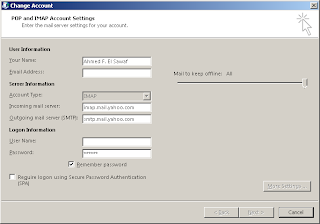
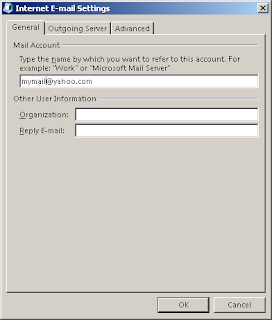
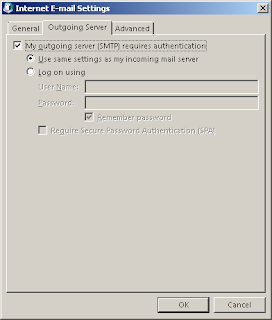
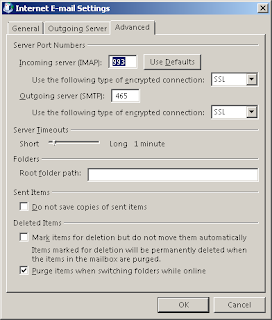
Configuring Microsoft Outlook 2013 IMAP for free Yahoo mail acount

Please configure on your own responsibility, since I am not sue whether that is a supported configuration or not!


Thanks to the below forum:
http://social.technet.microsoft.com/Forums/office/en-US/0111c5c2-9350-464a-8950-cc0cd23a039e/yahoo-imap-settings-for-outlook-2010-on-windows-7

Problem uninstalling Nero 7 Demo


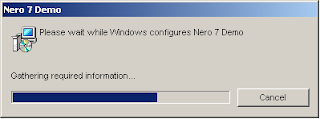
 The following endless uninstall dialogue was the main issue when trying to uninstall the application:


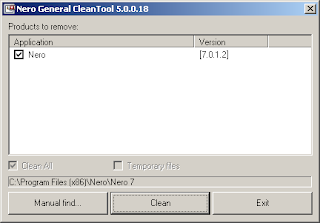
Dowloaded Nero Clean Tools 5


 Light of hope...


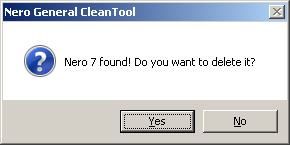
Voila!


Although it is not nice to either have issues or incompatibility issues with your software; but it is decent to have at least workarounds to keep the ball rolling!

Thanks Nero!

Monday, 27 May 2013

Remotely disconnect RDP (Remote Desktop Connection) Sessions

If your problem is the following dialog, then you are within the right hands.
Of course, required permissions are no question!

Command prompt:
>qwinsta /server:10.10.10.10
SESSIONNAME       USERNAME                 ID  STATE   TYPE        DEVICE
console                                    0  Conn    wdcon
rdp-tcp                                 65536  Listen  rdpwd
rdp-tcp#2         user 1                   1  Active  rdpwd

rdp-tcp#11        user2                    2  Active  rdpwd

- So, there are two logged in users with session IDs 1 & 2.
- To disconnect user with SessionID=2:
>reset session 2 /server:10.10.10.10

Thursday, 14 March 2013

Setting wireless networks priorities for Windows


1) Display list of current profiles:
>netsh wlan show profiles

Profiles on interface Wireless Network Connection:

Group policy profiles (read only)
---------------------------------
    <None>

User profiles
-------------
  

    All User Profile     : BASIC_IBIS

    All User Profile     : Belkin

    All User Profile     : Serena-WiFi

    All User Profile     : MOBILE


    All User Profile     : belkin54g


2) Change profiles priority:

>netsh wlan set profileorder name="Belkin" interface="Wireless Network Connection" priority=1
Priority order of profile "Belkin" is updated successfully.

C:\Users\sawafa.EMRO>netsh wlan show profiles

Profiles on interface Wireless Network Connection:

Group policy profiles (read only)
---------------------------------
    <None>

User profiles
-------------
    All User Profile     : Belkin
    All User Profile     : BASIC_IBIS
    All User Profile     : Serena-WiFi
    All User Profile     : MOBILE
    All User Profile     : belkin54g


Sunday, 13 January 2013

To identify shared folders on your Windows machine

Start -->
Control Panel -->
Administrative Tools -->
Computer Management (System Tools --> Shared Folders --> Shares)


Screenshot from Windows 7 box.

Sunday, 11 November 2012

Execute an application in another security context on Windows

runas /user:test@domain iexplorer.exe

Identifying Active directory group members using TSQL on MS SQL Server

exec master.dbo.xp_logininfo 'DomainName\GroupName','members'

Prerequisites: Requires membership in the sysadmin role for the database server.
Requires EXECUTE permission for this stored procedure within the master database.

P.S.
By experiments, I  noticed that I could enumerate only members for groups to which I belong.