Tuesday, 1 October 2013

Tip: Syncing Internet Explorer Favorites (Windows 7) across different machines using Dropbox

1) Goto IE Favorites folder.
2) Change Folder Location to Dropbox "Favorites" folder.
Note: Don't forget to create the new folder  "Favorites", so that the bookmark files are not moved to the root Dropbox folder.

 3) Select the just created "Favorites" folder within Dropbox.

 4) Move all files and subfolders.


Note: In case you want to sync your bookmarks with Apple Safari bookmarks, you can still use iCloud, and selecting Internet Explorer Bookmarks for syncing.

--Update 02/10/2013----
iCloud 3.0 caused the return of my deleted files.
When I uninstalled it, everything went smooth! Of course, your bookmarks are now no longer synchronized by Safari :(
--------------------------


Applied on :
Windows 7 Professional SP1
Internet Explorer 10.0.9
Dropbox 2.0.22
iCloud 3.0

Saturday, 28 September 2013

Apple: USB Power Adapter Takeback Program

Yes, it is true and I got my 3rd party USB power adapter replaced for half the price of a new one!

How is that? Can you recall the incident of the Chinese lady who died through an electric shock while talking through the iPhone 5 while it is being charged?! Apple is trying to show that they care.

Thanks Apple.

http://www.apple.com/support/usbadapter-takeback

Starting August 16, 2013  and is valid until October 18, 2013

Monday, 9 September 2013

Business Tip: One of the 3 biggest corporates for...

Keep in mind when;

a corporate representative declares that his corporate is one of the biggest 3 in that business, make sure that this corporate is the third!!!

Sunday, 1 September 2013

SharePoint 2010: Adding KPI Indicators icons to custom list

 Snap from expected output:

1) Add indicator column as a calculated column with this formula.
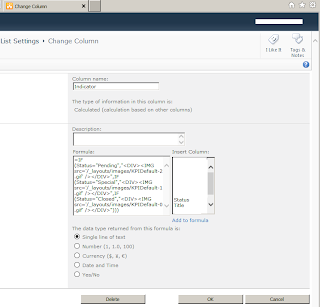

Formula Field:
=IF(Status="Pending","<DIV><IMG src='/_layouts/images/KPIDefault-1.gif' /></DIV>",
IF(Status="Special","<DIV><IMG src='/_layouts/images/KPIDefault-2.gif' /></DIV>",
IF(Status="Closed","<DIV><IMG src='/_layouts/images/KPIDefault-0.gif' /></DIV>")))


2) Add the following script in the HTML after editing the page and adding a new ContentEditor:
Using calculated columns to write HTML
-- Quote From blog.PathToSharePoint.com:
<script type="text/javascript">
//
// Text to HTML
// Feedback and questions: Christophe@PathToSharePoint.com
//
var theTDs = document.getElementsByTagName("TD");
var i=0;
var TDContent = " ";
while (i < theTDs.length) {
try {
TDContent = theTDs[i].innerText || theTDs[i].textContent;
if ((TDContent.indexOf("<DIV") == 0) && (TDContent.indexOf("</DIV>") >= 0)) {
theTDs[i].innerHTML = TDContent;
}
}
catch(err){}
i=i+1;
}
//
// ExpGroupRenderData overwrites the default SharePoint function
// This part is needed for collapsed groupings
//
function ExpGroupRenderData(htmlToRender, groupName, isLoaded) {
var tbody=document.getElementById("tbod"+groupName+"_");
var wrapDiv=document.createElement("DIV");
wrapDiv.innerHTML="<TABLE><TBODY id=\"tbod"+ groupName+"_\" isLoaded=\""+isLoaded+ "\">"+htmlToRender+"</TBODY></TABLE>";
var theTBODYTDs = wrapDiv.getElementsByTagName("TD"); var j=0; var TDContent = " ";
while (j < theTBODYTDs.length) {
try {
TDContent = theTBODYTDs[j].innerText || theTBODYTDs[j].textContent;
if ((TDContent.indexOf("<DIV") == 0) && (TDContent.indexOf("</DIV>") >= 0)) {
theTBODYTDs[j].innerHTML = TDContent;
}
}
catch(err){}
j=j+1;
}
tbody.parentNode.replaceChild(wrapDiv.firstChild.firstChild,tbody);

}</script>
-- Un-quote from blog.PathToSharePoint.com:


Tip:
This solution did not work on grouping by list! HTML string was displayed instead of the icons!
Tried applying this then grouped; however, it did not work either.

You get the following on grouping:

Thursday, 29 August 2013

SharePoint 2010 conditional formatting for lists

The below was exactly what I was about to blog about, no need to repeat it!


Bander's Blog Post:
SharePoint Lists Conditional Formatting using SharePoint Designer 2010
Thanks!

Security Tip: SharePoint 2010 Access to all users (Authenticated users)

Site Actions -->
Site Permissions -->
Grant Permissions -->
Select Users --> NT AUTHORITY\authenticated users


What happened to Add All Authenticated Users?

Anti-Secuity Tip: Really simple iOS Passcode

1) Enable (Simple Passcode) option, so that your code can constitute 4 numeric digits only.


2) Simplest Passcode to enter is: 2 5 8 0. Four digits is a vertical line.


Tip:
- This post is not a security post as the name implies.
- This post is useful in similar cases when you register Exchange account with a policy to have a passcode; however, you are sure that your device is secure and you do want to have the least interruption with the passcode screen.

Tuesday, 6 August 2013

OLE DB error: OLE DB or ODBC error: A network-related or instance-specific error has occurred while establishing a connection to SQL Server. Server is not found or not accessible. Check if instance name is correct and if SQL Server is configured to allow remote connections. For more information see SQL Server Books Online.; 08001; Client unable to establish connection; 08001; Encryption not supported on the client.; 08001.

Error Message:
OLE DB error: OLE DB or ODBC error: A network-related or instance-specific error has occurred while establishing a connection to SQL Server. Server is not found or not accessible. Check if instance name is correct and if SQL Server is configured to allow remote connections. For more information see SQL Server Books Online.; 08001; Client unable to establish connection; 08001; Encryption not supported on the client.; 08001.

Tools:
SQL Server Data Tools for SQL Server 2012
Microsoft SQL Server 2012 

Scenario:
Using the above tools to create  a cube in a new business analysis solution, I was getting the top error when I try to process the cube. Finally I discovered that the issue was that I am using provider Native OLE DB\SQL Server Native Client 11.0 while the DB acceptability was SQL Serevr 2005 (90).

Resolution:
this can be solved by reverting to the provider Native OLE DB\SQL Server Native Client 10.0