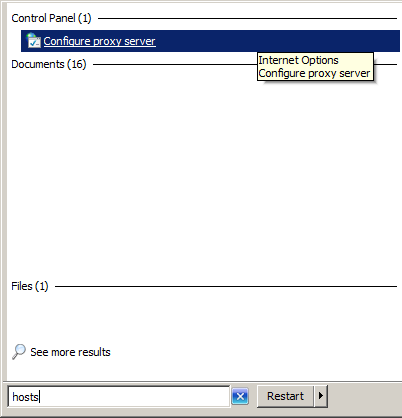
Although the Internet Options dialogue box appears as a implicit component within the Internet Explorer, it can be called separately without the need even to open the browser. This is very helpful especially if you are using a laptop like me, and within the office you need to enable the proxy settings and to disable it every time you are out of the office. Moreover, knowing that most other applications read from that place for the proxy settings, it appears to me as a very handy shortcut.
Showing posts with label Microsoft Windows 7. Show all posts
Tuesday, 5 August 2014
Thursday, 20 March 2014
Moving a window across multiple screens on windows OS
While the window is active:
Windows keyboard button +(right or left) direction key
Sunday, 16 February 2014
Replace your iTunes media Library by an existing media library
1) Change iTunes library:
Hold down Shift while clicking on the iTunes shortcut.
Choose Libarary... to point to your original library
2) Import existing library folders:
File menu is not enabled by default, to enable it press Alt + F
File --> Add Folder to Library... (Select your original library folder)
-- iTunes 11.1.4.62 (Windows)
Hold down Shift while clicking on the iTunes shortcut.
Choose Libarary... to point to your original library
2) Import existing library folders:
File menu is not enabled by default, to enable it press Alt + F
File --> Add Folder to Library... (Select your original library folder)
-- iTunes 11.1.4.62 (Windows)
Wednesday, 25 December 2013
Warning: Issue when using Dropbox on Windows 7 that can waste your file irreversibly
Reproduction:
I have used a pdf file for this scenario.
1) Open your pdf from its original location.
2) Move the file to the destination folder on Dropbox by dragging and selecting "Move Here".
3) Ignore this first dialog box.
4) Close the pdf.
5) Repeat Step (2).
6) Select "Move and Replace" from the second dialog.
7) Select Cancel for the first dialog.
--> File disappeared without any trace for its existence!
And not in the Recycle Bin.
It is worth mentioning that I have tried the same procedure using non-Dropbox folder; however, the file was maintained in the destination folder.
Dropbox 2.0.22 (Identifying Dropbox Windows 7 client version)
Microsoft Windows 7 Professional SP1 64-bit
Thursday, 4 July 2013
Simple way to create Video DVD
First I tried Windows DVD Maker (Windows 7 native application), and after 2 trials each for 2 hours which both end by a message I could recognize its significance, then I searched online for some suggestions.
My recommendation is that simple application: DVD Flick
Good article about that topic:
http://www.online-tech-tips.com/computer-tips/burn-wmv-to-dvd/
My recommendation is that simple application: DVD Flick
- Set the project settings to your desierable media size and other options you prefer.
- Add your video files as titles and set whichever
- Create DVD
For video editing:
Movie Maker is the simplest tool I have used before, no much sophisticated options but free and does the job.
Movie Maker is part from Windows Live Essentials
http://www.online-tech-tips.com/computer-tips/burn-wmv-to-dvd/
Tuesday, 2 July 2013
Reset saved ftp password for windows
Right click on the ftp folder background:
Thanks to the post by SymonP_MSFT:
http://answers.microsoft.com/en-us/windows/forum/windows_xp-security/how-to-delete-or-reset-stored-ftp-site-passwords/133242cd-f4c6-4fa8-a74b-d98c8a617f4d
Thanks to the post by SymonP_MSFT:
http://answers.microsoft.com/en-us/windows/forum/windows_xp-security/how-to-delete-or-reset-stored-ftp-site-passwords/133242cd-f4c6-4fa8-a74b-d98c8a617f4d
Sunday, 30 June 2013
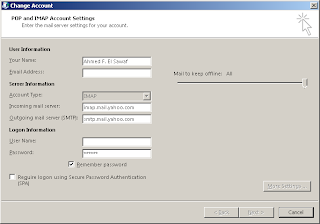
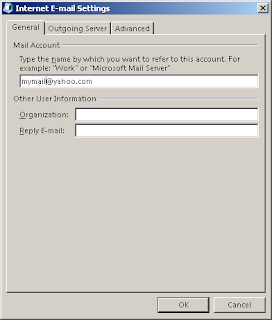
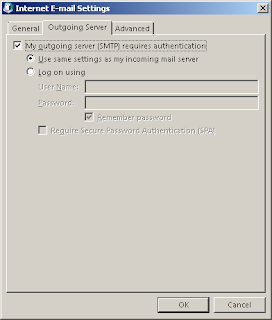
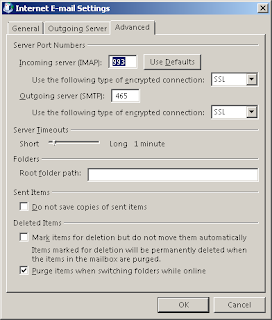
Configuring Microsoft Outlook 2013 IMAP for free Yahoo mail acount
Please configure on your own responsibility, since I am not sue whether that is a supported configuration or not!
Thanks to the below forum:
http://social.technet.microsoft.com/Forums/office/en-US/0111c5c2-9350-464a-8950-cc0cd23a039e/yahoo-imap-settings-for-outlook-2010-on-windows-7


Thanks to the below forum:
http://social.technet.microsoft.com/Forums/office/en-US/0111c5c2-9350-464a-8950-cc0cd23a039e/yahoo-imap-settings-for-outlook-2010-on-windows-7
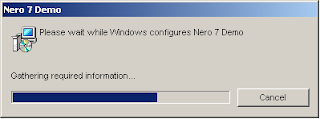
Problem uninstalling Nero 7 Demo
The following endless uninstall dialogue was the main issue when trying to uninstall the application:

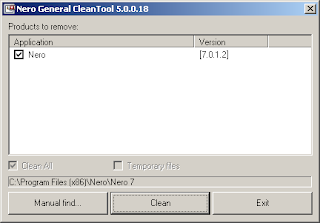
Dowloaded Nero Clean Tools 5

Light of hope...

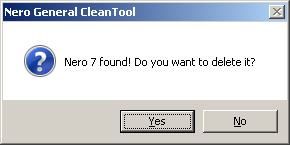
Voila!
Although it is not nice to either have issues or incompatibility issues with your software; but it is decent to have at least workarounds to keep the ball rolling!
Thanks Nero!
Wednesday, 31 October 2012
Wednesday, 8 August 2012
Can't edit photos copied from iPhone 4S iOS 5 to Windows 7 in Windows Photo viewer
Unfortunately, me too!!
Workaround, right click the photo and click Edit to open it in "Paint" application where you will be able to rotate and save.
Tuesday, 10 July 2012
Subscribe to:
Posts (Atom)